 Trade Panel
Follows your chart
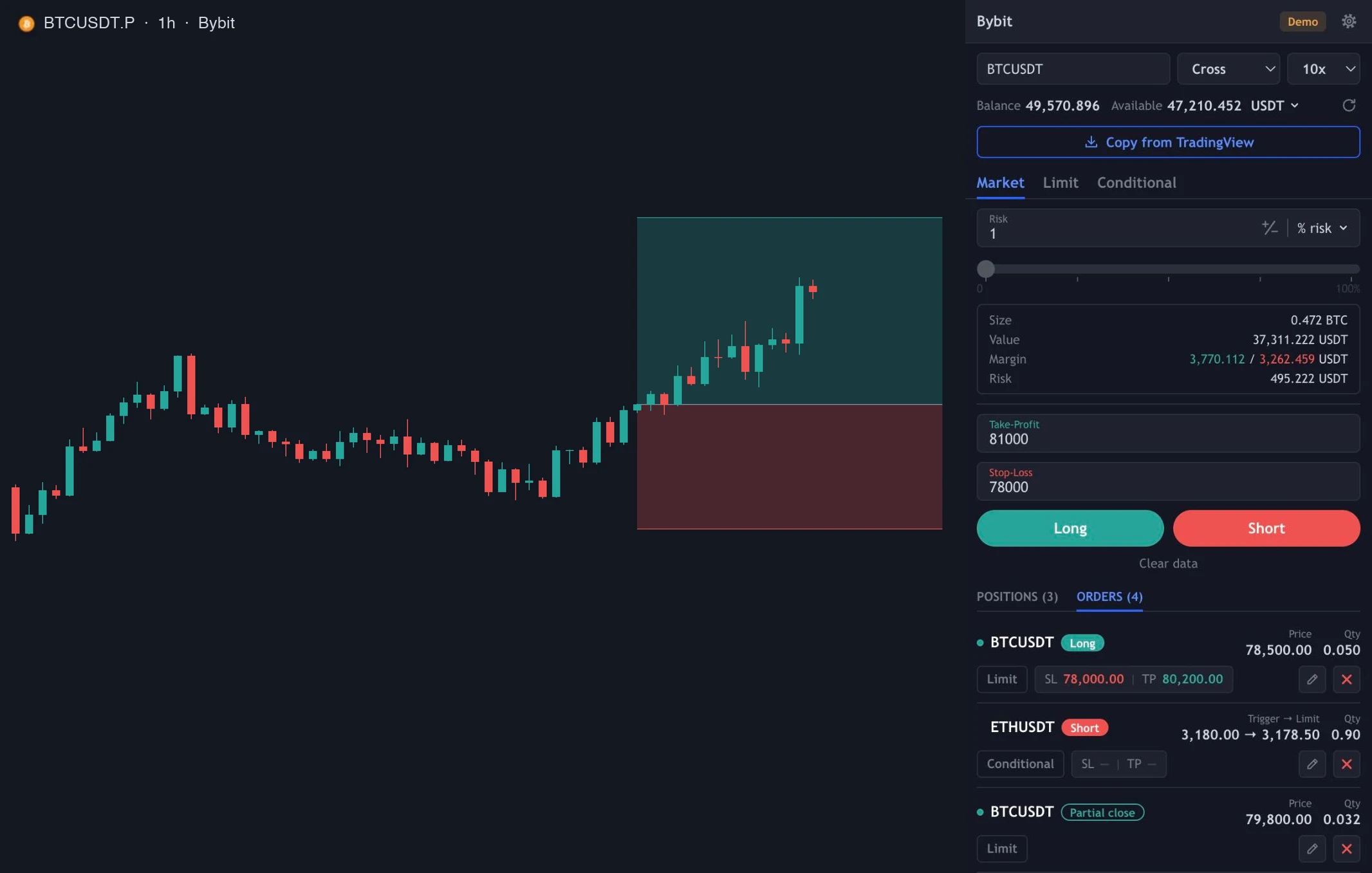
The panel takes the ticker from the active TradingView tab. Switch the chart and the order form switches with it.
Chrome side panel for TradingView
A trading panel beside your TradingView chart. Orders, position size by risk, stops and take profits on five exchanges, with your own API keys.
First 7 days free



 Demo and live accounts
What you get
The panel takes the ticker from the active TradingView tab. Switch the chart and the order form switches with it.
Set risk as a percent of balance or in USDT, or enter a fixed volume. With the stop in place, the calculator applies the exchange's quantity step and gives the exact size.
Works with the browser version of TradingView. Draw a Long or Short Position tool on the chart and copy its entry, stop and target into the panel in one click.
Manage positions in real time. Adjust, close in full or take partial profit in one click.
Automatic management of an open position: stop to breakeven, trailing stop or partial take profit, all by your rules and your trading algorithm.
Connect demo and live accounts on Bybit, OKX, Binance, Bitget and BingX. Switch between them in a couple of clicks.
How it works
Add it to Chrome and pin it. The panel opens beside any TradingView chart.
On your exchange, create a key with trading permission.
Create an account in the panel with the API key. The panel checks it and finds the right regional address by itself.
Pick the trading pair, decide the direction, copy the entry parameters from the TradingView position tool and press Buy.
Pricing
Starts when you install the extension.
Pay by card or crypto (5 USDT). Up to 2 devices.
Safety
FAQ
Perpetual futures on Bybit, OKX, Binance, Bitget and BingX. Spot is not supported.
If the prop account runs through one of the supported exchanges, yes, through API keys. TradingView's broker connection is not needed.
Locally in your browser, not synced to other devices. The extension's background worker signs each request and sends it straight to the exchange. Our subscription server only receives your license key and a device ID, never exchange keys.
For 7 days after you install the extension, the panel is free: market and limit orders on all supported exchanges, position control and autopilot. After that you need a subscription: $5 a month, paid by card or crypto. It adds conditional orders and all future features.
No. Trading derivatives is risky and you can lose more than you expect. Use the demo first and size every trade by what you can afford to lose.
Chrome Web Store listing is in review.